The Best Evergreen Digital Products to Create and Sell Year-Round

Some links on this site may be affiliate links. This means I may earn a small commission—at no extra cost to you. I only recommend tools I genuinely believe are beginner-friendly and useful.
If you’ve been thinking about creating digital products but keep getting stuck on what to make, this guide is here to remove the guesswork with evergreen digital products to get you started.
Evergreen digital products are assets you create once and then sell repeatedly, without needing to relaunch, chase trends, or reinvent your offer every few months. They’re especially powerful for introverted creators, faceless businesses, and anyone who wants income that feels sustainable rather than draining.
In this post, you’ll learn:
- Which digital products consistently sell year-round
- How guides/workbooks, templates, and courses compare
- Time commitment, skill level, and difficulty for each
- Where to sell them (and what platforms actually cost)
- How to create products with minimal upfront investment
- Which products beginners should start with (and why)
- Why evergreen products work and which ones usually don’t
- How to use the 3 most profitable niches (health, wealth, relationships) strategically
- Why Evergreen Digital Products Work So Well
- The 3 Best Evergreen Digital Product Types (Compared)
- 1. Guides & Workbooks (Best Starting Point for Beginners)
- 2. Templates (High Value, Low Ongoing Effort)
- 3. Courses (Highest Earning Potential, Highest Effort)
- Easiest to Hardest: Digital Product Comparison
- How to Create Digital Products With Minimal Cost
- How to Market Evergreen Products (Without Burnout)
- Products That Don’t Sell Well All Year (And Why)
- Using the 3 Most Profitable Niches Strategically
- Mini Summary
- Your Next Step Starts Here
Why Evergreen Digital Products Work So Well
Evergreen products solve ongoing problems, not seasonal or trend-based ones. Because they are always valuable (evergreen), these products can save time and effort (constantly creating something new), plus provide more consistent sales. This is what makes evergreen digital products so powerful. You can create them once and sell them on repeat indefinitely.
Not sure what products to create or who to create them for?
There are certain things people will always want, like:
- Better health and energy
- More money, stability, or freedom
- Stronger relationships and confidence
When your product addresses a persistent pain point, demand doesn’t disappear after a launch window or trend cycle. That’s what makes these products reliable income builders, especially when paired with search-based platforms like blogs or Pinterest.
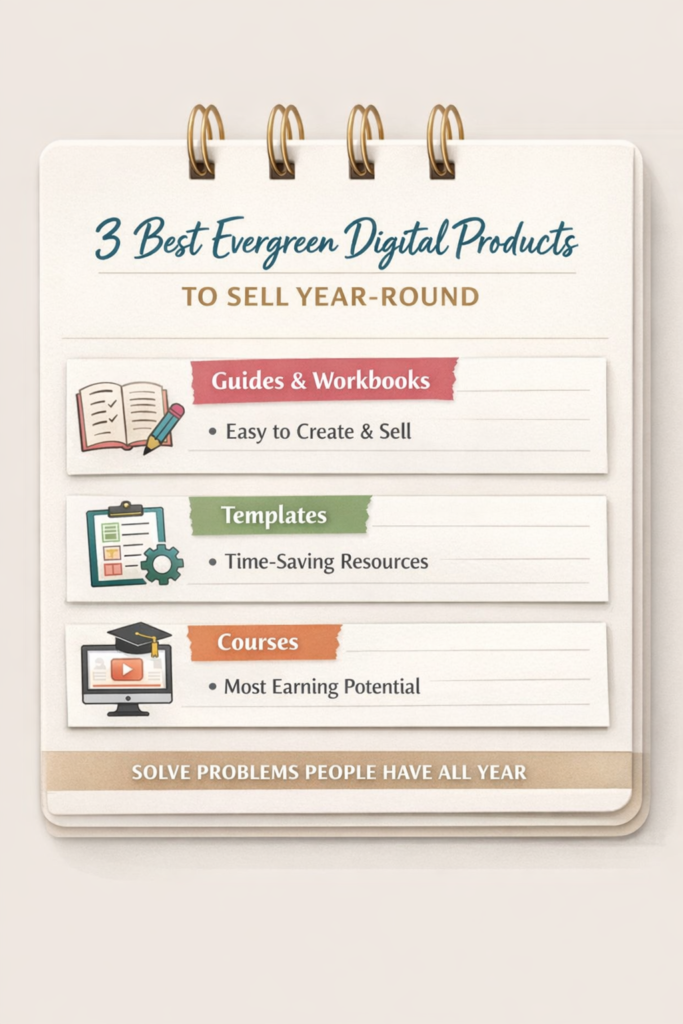
The 3 Best Evergreen Digital Product Types (Compared)
In this section, we’re going to take a deeper look at the different types of digital products that you can focus on. Keep in mind, you don’t have to choose just one; you can always mix and match or add on later.
The types of products we’re going to look at are:
- Guides & Workbooks
- Templates
- Courses
For each, we’ll look at:
- What it is
- Time to create
- Skill level required
- Difficulty to sell
- Best platforms to sell on
- Why it sells year-round
1. Guides & Workbooks (Best Starting Point for Beginners)
What They Are
Guides and workbooks are step-by-step resources that help someone achieve a specific outcome faster or with less confusion. Generally, these are PDF’s, but they can also be editable online templates (like Canva templates) or Google Docs.
Examples:
- “Beginner’s Guide to Freelancing Without Social Media”
- “30-Day Budget Reset Workbook”
- “Faceless Content Planning Guide”
They’re usually:
- 10–40 pages
- Text-based with simple visuals
- Outcome-focused
They can either be viewed/ filled in online or be a printable workbook that people can print and fill out. It can be beneficial to offer both options, as some people will prefer one format over the other.
Time Commitment
Low to moderate
- 5–15 hours total for most beginners
- Can be created in short sessions
- Easy to update later
If you can outline a process and explain it clearly, you can create a guide.
If you feel stuck finding the right words or explaining things in simpler terms, I suggest using something like ChatGPT to offer you some suggestions to help break through the writer’s block.
Skill Level Required
Beginner-friendly
You do not need:
- Advanced design skills
- Tech experience
- A large audience
Clear thinking and basic writing are enough.
If you’re worried about designing/ formatting your guide to look nice, Canva has a ton of free templates that you can use to get started.
Difficulty to Sell
Low
Why?
- Lower price point ($7–$37 typically)
- Easy impulse buy
- Solves one clear problem
This makes guides ideal for first-time creators. They’re a quick win that can help you build momentum.
Best Platforms to Sell
- Beacons – Free plans available, beginner-friendly
- Gumroad – ~10% platform + processing fees
- Etsy – ~$0.20 listing fee + ~6.5% transaction fee
I personally have sold digital products on Etsy & Beacons, and for beginners, I’d highly recommend starting with Etsy. I say this because Etsy already has a ton of traffic, which makes it easier for people to find your product. With Beacons, you can have a simple landing page, but unless you have consistent social media or Pinterest posts directing people to it, odds are it won’t get as many views.Why Guides Sell All Year
The problems they solve don’t expire:
- Wanting extra income
- Wanting clarity
- Wanting a simpler way to start
As long as the problem exists, the product remains relevant.
2. Templates (High Value, Low Ongoing Effort)

What They Are
Templates are pre-made frameworks/designs that someone can customize instead of starting from scratch. The key thing that makes templates valuable is that they help people save time.
Popular template examples are:
- Canva social media templates
- Budget spreadsheets
- Email sequences
- Content calendars
Like guides and workbooks, templates solve an ongoing problem: saving time and removing the guesswork of where to start.
Time Commitment
Moderate upfront, low afterward
- 10–25 hours to create initially
- Requires testing and refinement
- Once created, very low maintenance
Generally, when selling templates, you’re not selling one at a time. They usually come as a bundle. You could have anywhere from 10-100+ templates in your bundle, depending on what the template is for. For something like email templates, you might only have 7-10 walk customers through an email sequence. For social media templates, you’ll likely need a lot more. However, each template will likely only take a few minutes to create once you’ve had some practice.
Skill Level Required
Beginner to intermediate
You don’t need advanced design skills or years of experience to create templates that sell. What matters most is understanding how the process works from start to finish for the person using your template.
You’ll need:
- Basic tool familiarity (Canva, Google Sheets, Notion, etc.)
You should be comfortable creating, editing, and duplicating files so buyers can easily use and customize them. - An understanding of how the system works
This means knowing the workflow your template supports, not just how to design it.
For example:- A budget template works because you understand how people track income, expenses, and monthly goals.
- A content planner works because you know how content is planned, batched, and scheduled.
In other words, you’re creating a shortcut, not just a pretty layout.
A simple, clean, easy-to-use template will outperform something visually complex but confusing. Buyers care far more about whether it saves time and reduces decision fatigue than whether it looks fancy.
Difficulty to Sell
Moderate
Templates perform best when:
- The outcome is obvious
- The use case is clear
- The buyer can instantly imagine using it
They often sell best when paired with:
- A short guide
- A tutorial video
- Clear examples
Another great thing to include when selling templates is a mockup of it in use. If you’re selling Instagram templates, show a mockup of what their grid would look like with your designs. For email templates, you can show them how one of the examples looks (and sounds) when fully filled out.
Best Platforms to Sell
- Etsy – Built-in search, competitive pricing
- Gumroad – Flexible pricing, easy delivery
- Shopify – Monthly fee (~$39+) but full control
Here again, I would really suggest Etsy for beginners because of the traffic. If you do find you’re making good sales or if you create a social media presence for your business to help direct more traffic, then you could expand to another platform.
Why Templates Sell All Year
People will always want:
- Faster workflows
- Less decision fatigue
- Systems that “just work”
Templates reduce effort, which is a timeless desire.
3. Courses (Highest Earning Potential, Highest Effort)
What They Are
Courses walk your audience step-by-step through a full skill or transformation. This is done through:
- Video lessons
- Modules
- Worksheets or assignments
Examples:
“Create and Sell Digital Products”
“Start a Freelance Business From Scratch”
“Build a Pinterest Traffic System”

Time Commitment
High
- 30–100+ hours to create
- Planning, recording, editing, hosting
- More upkeep over time
Courses are not “quick wins,” but they can scale significantly. In addition to the course itself, you may also need to create quizzes, worksheets, and other resources to help students learn and apply the teachings.
Skill Level Required
Intermediate
You’ll need:
- Confidence in the subject
- Basic tech skills
- Comfort structuring information
You do not need to be an expert, but you must be ahead of your students.
Difficulty to Sell
Higher
Courses are typically harder to sell, especially as a beginner, because:
- Higher price point ($97–$997+)
- More buyer hesitation
- Requires trust
Courses sell best when:
- You already have proof
- You’ve helped people in smaller ways first
Courses are a great thing to create after you already have a successful guide or workbook on the same topic. Because you already know people are willing to pay to solve the specific problem, and you have a list of possible students, it can be easier to sell the course to them as a deeper dive or how to solve the next logical problem they have.
Best Platforms to Sell
- Skool – Monthly fee, includes community
- Teachable – Transaction fees on lower tiers
- Kajabi – Higher monthly cost, fewer fees
Honestly, for courses, I’d suggest selling it in as many places as possible, at least in the beginning. If you find a platform is way underperforming another, then it’s ok to cut that one out.
Why Courses Can Still Be Evergreen
Foundational skills don’t change as fast as tactics:
- Marketing principles
- Business basics
- Personal development frameworks
Courses remain evergreen when they teach systems, not trends.
Easiest to Hardest: Digital Product Comparison
From least to most difficult to create and sell:
- Guides & Workbooks – Best for beginners
- Templates – Best for system thinkers
- Courses – Best after validation
Beginner recommendation:
Start with a guide → add templates → build a course later.
This progression builds:
- Skill
- Confidence
- Trust with your audience
It may take a while to build out each level of your offerings, but what’s better than having one evergreen digital product is having three. Especially when a customer can start with a lower-tier product and be upsold to a higher-tier to maximize your returns.
How to Create Digital Products With Minimal Cost
You do not need expensive software or branding in order to be successful in selling digital products.
Low-Cost Tool Stack
- Canva (free or low-cost)
- Google Docs / Sheets
- Free website or link-in-bio tools
- Simple PDF exports
Smart Shortcuts
- Turn your notes into a guide
- Repurpose blog posts into products (guides/worksheets)
- Start text-based before adding video
- Validate with a small product first
Keep things simple in the beginning and slowly add in more bells and whistles as you gain more confidence (if needed).
How to Market Evergreen Products (Without Burnout)
Evergreen products pair best with evergreen marketing—content that can be automated and continues to bring in traffic and sales long after it’s published.
Best Low-Energy Channels
- Blog content
- SEO-driven YouTube (optional)
- Email sequences (encourage email signup with a small freebie)
Focus on:
- One problem
- One product
- One main traffic source
Consistency beats volume. Again, keep it simple when you’re starting out so you don’t burn out.
Products That Don’t Sell Well All Year (And Why)
Not all digital products are evergreen.
Examples That Struggle
- Trend-based social media prompts
- Platform-specific hacks that change often
- Seasonal planners (unless updated yearly)
- Time-sensitive challenges
These require constant updates or relaunches, which breaks sustainability. When deciding on your first product, refer back to this section to make sure you’re not falling into one of these categories.
Using the 3 Most Profitable Niches Strategically
You don’t need to reinvent the wheel. There are certain broad niches that earn the most and remain in demand over time. If you need some help choosing your niche and mapping out your first products, you can download my free guide below.
The three most profitable niches are:
1. Health
Evergreen angles:
- Stress management
- Weight loss systems
- Habit tracking
- Mental wellness
Product ideas:
- Meal planners
- Workout guides
- Habit trackers
2. Wealth
Evergreen angles:
- Budgeting
- Side income
- Skill-building
Product ideas:
- Budget templates
- Freelancing guides
- Digital product planners
3. Relationships
Evergreen angles:
- Confidence
- Communication
- Self-worth
Product ideas:
- Journals
- Boundary-setting workbooks
- Dating clarity guides
The key is narrowing the outcome, not the niche. Now, I’m not saying you can’t make money creating digital products outside of these broader niches, but these are the most in demand.
Mini Summary
- Evergreen products solve ongoing problems
- Guides are the easiest place to start
- Templates sell time-saving systems
- Courses scale later, not first
- Simple tools are enough to begin
- Health, wealth, and relationships drive demand
Your Next Step Starts Here
If you’ve been waiting for a sign to start, this is it.
You don’t need a massive audience, fancy tools, or perfection. You need one clear problem and a simple solution.
If you want a beginner-friendly path that shows you exactly how to create and sell evergreen digital products—without having to show your face online or burning yourself out. Want to know how? Explore Digital Wealth Academy. It’s the structured roadmap I wish I had found sooner. It helped me overcome my overwhelm and showed me how to start taking the right action.
Remember, you’re more capable than you think. The next step doesn’t have to be complicated—it just has to be intentional.
Let me know in the comment section what is the first digital product you’re going to create?








Leave a Reply