How to Use ChatGPT to Plan Your Business in One Afternoon

Some of the links in this post are affiliate links, which means I may earn a small commission if you choose to purchase through them—at no extra cost to you. I only recommend tools and resources I genuinely use or believe can help you build a sustainable online business.
If you’ve been staring at your laptop thinking, “I know I want an online business… I just don’t know what to do first”, you’re not lazy, behind, or incapable.
You’re overwhelmed.
And for introverted women especially, overwhelm can look like overthinking, second-guessing, and quietly putting things off because everything feels too big.
Here’s the simple truth: you don’t need more motivation. You need clarity.
That’s exactly where ChatGPT comes in.
By the end of this tutorial, you’ll know how to use ChatGPT to plan your entire faceless online business in one afternoon, without complicated tech, and without spiralling into “I’m doing this wrong.”
Table of Contents
Why Use ChatGPT For Business Planning?
ChatGPT is great for business planning because it allowes you to use AI to think with you, instead of trying to figure everything out alone in your head. AI can be a great tool for anyone just starting out who feels stuck in analysis paralysis or overwhelmed with where to start.
Instead of:
- Staring at a blank Google Doc
- Overthinking your niche
- Jumping between ideas
- Consuming endless content without clarity
- Feeling frozen because you don’t know the “right” order
ChatGPT becomes your:
- Thought partner
- Organizer
- Brain dump assistant
- Structure builder
It helps you make decisions about:
- Your niche
- Your audience
- Your content pillars
- Your offers
- Your brand voice
- Your posting plan
- Your funnel
- Your monetization path
For introverted and faceless creators, this is powerful because it:
- Reduces decision fatigue
- Removes pressure to “figure it out” alone
- Gives you clarity without visibility
- Lets you stay private while still moving forward
Think of ChatGPT not as a shortcut, but as a calm guide that helps you sort your thoughts into a plan. It can offer you guidance and feedback on your ideas throughout the planning process to keep you moving forward. I do want to note that ChatGPT is known to be agreeable (can be a “yes man”), so it’s good to ask it for feedback as to why an idea might not work or how it can be improved, vs simply asking if it’s a good idea or not. This way, it’s forced to do more critical thinking, and you’ll get a more thought-out answer that you can use to help you decide the best course of action.
Why This Matters for Introverted Solopreneurs
If you’re introverted, planning often feels harder, not because you’re less capable, but because you tend to:
- Think deeply
- See all possibilities
- Want to do things right
That combination can easily turn into paralysis. As mentioned before, using AI when you’re in this headspace is a great option because it can allow you to regain your momentum.

ChatGPT helps by:
- Narrowing your options
- Reflecting your thoughts back clearly
- Giving you structure when your brain feels noisy
This is especially helpful if you’re building a faceless online business, where clarity matters more than charisma.
How to Plan Your Entire Faceless Business with ChatGPT (In One Afternoon)
You don’t need a full day.
You don’t need a perfect plan.
You need 60–90 focused minutes and the willingness to start imperfectly. Committing to simply start taking action is the biggest hurdle you’ll face. So many people spend years thinking about the business they want to start without ever taking the first step towards making it a reality. For you, that changes today. Today, you become one of the few who actually take action, even if it’s imperfect.
Below is a beginner-friendly 5-step workflow you can repeat anytime you feel stuck.
Step 1: Define Your Niche & Audience (10 minutes)
This is where most beginners get stuck, and where ChatGPT shines.
You don’t need to nail down the “perfect niche.”
You need a clear starting point. You can always refine this later.
Copy + paste this prompt into ChatGPT:
Help me choose a profitable niche for my faceless online business. I want a niche that fits:
– My personality: [introverted / quiet / analytical]
– My interests: [list a few]
– My ideal customer: [who you want to help and why]
– My experience level: [beginner / learning/ expert]I also want to make sure my niche is profitable and falls within one of these three broader categories of health, wealth, or relationships (as these tend to be the most profitable).
Please list 5 niche options and explain why each one is a good fit.
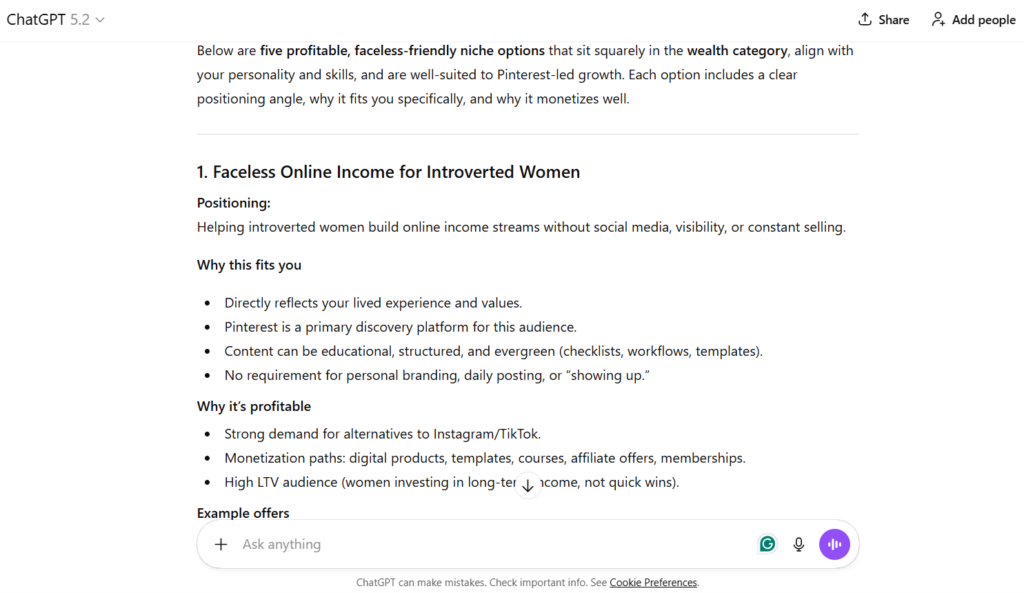
This step alone often brings a huge sense of relief because you’re no longer guessing. Once you have your list of niches, you can choose the one that feels most aligned with the vision you have for your business and move on to the next step.
Step 2: Create Your Content Pillars (10 minutes)
Once your niche is clear, everything else becomes easier. Now, you can start building out your content plan for your business.
Content pillars are simply the topics you talk about repeatedly. Creating content pillars helps to keep you on track and on topic when you’re sharing content with your audience.
Tell ChatGPT which of the niche suggestions you decided to go with, and then enter in the prompt below.
Prompt:
Based on the niche we chose, create 5 beginner-friendly content pillars. Make sure each pillar solves a problem my ideal audience has.
Example for a faceless online marketing niche:
- AI tools for beginners
- Faceless content ideas
- Pinterest basics
- Digital product ideas
- Affiliate marketing explained simply
Once you have your content pillars, you won’t need to worry about inventing content anymore; you can simply rotate through your pillars calmly.
Step 3: Map Out Your Monetization Strategy (15 minutes)
This is where beginners often feel uncomfortable — “Is it too early to think about money?”
No, it’s not.
Clarity around monetization actually reduces anxiety, because you know what you’re working toward. The whole point of a business is to earn a profit. You don’t need to start charging for products or services right away, but you do need to have an idea of what you’re going to offer over time and for how much.
So, after you have your content pillars sorted out, follow up with this prompt below to help identify opportunities for you to monetize your business.
Prompt:
Create a beginner-friendly monetization plan for my faceless brand. Include:
– Affiliate income
– Low-ticket digital products
– Mid-ticket offers
– Email list-building strategies
– What to sell first
– What to sell laterKeep it simple and beginner-safe.
ChatGPT will give you a realistic, step-by-step earning path, without pressure.
Remember, these are all suggestions and you don’t have to include all of them in your monetization plan if you don’t want to. Choose the products and offers that you feel will have the most value for your target audience and that feel most aligned with the type of business you want to create.
Step 4: Build a 30-Day Content Plan (20 minutes)
This is where your plan becomes actionable. Once you have your niche, content pillars, and your monetization strategy, you can build an actionable plan for connecting with your audience and getting your offers out there for them to see.
Prompt:
Create a 30-day faceless content plan using Pinterest (or your chosen platform) and short-form content. Each day include:
– One post idea
– A hook
– A short description
– One clear CTAKeep everything simple and beginner-friendly.
Pro Tip:
Ask ChatGPT to turn these ideas into:
- Video scripts
- Pinterest pin text
- Voiceover outlines

This can save you a lot of time and stress because it takes each content idea and gives you 3 ways to repurpose it. For example, your static Pinterest pin can be repurposed as a short video tutorial and a text-on-screen video with b-roll in the background. With this, your 30-day content plan can easily become a 90-day content plan!
Step 5: Plan Your Lead Magnet, Funnel & Landing Page (20 minutes)
Next up, you’ll be setting up your marketing funnel. If you’re not familiar with what this is, it’s simply the steps someone goes through before they decide to buy or sign up for something.
Not everyone starts at the same place, and not everyone reaches the end, but the funnel helps guide them.
The purpose of a marketing funnel is to:
- Help people feel less confused
- Help them learn step by step
- Help them decide when they’re ready, not rushed
Instead of saying “buy this!” right away, the funnel helps first, then asks.
To create your marketing funnel, use the prompt below.
Prompt:
Create a simple faceless marketing funnel for beginners. Include:
- One lead magnet idea
- A landing page outline
- A 5-email welcome sequence
- Where to place affiliate links
- Suggested CTAs
Build this for my specific audience we identified earlier.

If you don’t already have a platform for your lead magnets, email funnel, or landing page, I highly recommend checking out Beacons. It’s a very easy-to-use all-in-one platform, and the free plan offers everything you’ll need to get started.
It’s also a great tool for reducing overwhelm because you can have everything all in one place, and it has its own built-in AI helper to help walk you through setting up your landing page if needed, and aesthetic templates to make designing your page easy.
Next Steps
Take Action!
Now that you have your business all planned out, it’s time to start putting the plan into action. This means start creating your lead magnet, digital products, and signing up to be an affiliate (if necessary) to get your products in order.
Next, start creating content for the first week of your content plan. I highly recommend using Canva for this because you can use it for free and it’s user-friendly, and they have thousands of templates to help you design your content, so you don’t get stuck overthinking it.
Finally, set up your landing page, add your lead magnet/ digital products, and affiliate offers to your page and set up an email sequence for each. After that, you can start sharing your first week of content to promote your landing page and your offers.

Try to stay on top of your content by creating a week in advance. Once you find a good rhythm with creating content, bulk creating and scheduling your content can help you stay weeks or even months ahead. At that point, showing up is on autopilot. So, if you end up getting sick or simply want to take a break, your content is already taken care of.
Why I Love Using ChatGPT For My Business
When I first started, I thought planning meant I needed to take months to do research and have every possible scenario figured out before I could take any action.
What I actually needed was permission to start with a simple system and to start imperfectly.
ChatGPT helped give me that and acted as a sort of business partner that I could bounce ideas off of. Once I had a plan was clear, taking action felt possible again.
You don’t need to hustle harder.
You need a structure that respects your energy.
There are a lot of people who are still opposed to using AI, but personally, I’ve found it to be a great help when it comes to getting out of my own way and taking action for my business.
Mini Summary
- You can plan your business in one calm afternoon
- ChatGPT removes decision fatigue
- You don’t need to be on camera to get clarity
- Structure creates confidence
- A simple plan is better than a perfect one
- You are capable of this
My Recommendation
If you have your plan ready to go and still need to take that first step, I once again want to recommend you start with Beacons for setting up your lead magnet, digital products, and landing page. As I mentioned before, it’s incredibly simple to set up, and their free plan is amazing! I honestly haven’t found a better free option out there and can’t recommend it enough.
I’ll link it again here if you’d like to check it out
Let me know in the comments what has held you back the most when it comes to starting your own business?









Leave a Reply